Adding Free SSL/TLS on Kubernetes (using CertManager and LetsEncrypt)
You have a shiny new Kubernetes cluster. You deploy your hello-world app and can now reach it via a...
- Kubernetes
- Security
You have a shiny new Kubernetes cluster. You deploy your hello-world app and can now reach it via a NodePort service at http://
As the workload begins to increase, you decide to use a Loadbalancer Service instead. But then it occurs to you - using a Loadbalancer service for each workload can become so expensive.
Ingress to the rescue!
You write a simple ingress manifest and kubectl apply! Boom 💥
apiVersion: networking.k8s.io/v1
kind: Ingress
metadata:
  labels:
    app: hello-world
  name: example.com
spec:
  rules:
  - host: example.com
    http:
      paths:
      - backend:
          service:
            name: hello-world
            port:
              number: 80
        path: /
        pathType: Prefix
But without an ingress controller, your ingress resource has zero effect. You remember that some guy on YouTube had mentioned one Ingress-Nginx controller and you think let’s check that out.
Dang! After 2 hours, you find on StackOverflow that your k3s cluster came bundled with the Traefik Ingress Controller 😡
You create an A record to configure your domain to point to the public IP Address of the (single) node in your cluster. With a big smile, you open a new tab on your browser, head to the URL bar and navigate to your domain (example.com). You get a response, “your connection is not secure”.
What do you do now?
In the following secion, I’ll show you how to add TLS to your Kubernetes cluster using cert-manager to automate certificate management operations such as issuance and renewal.
Cert-manager + LetsEncrypt
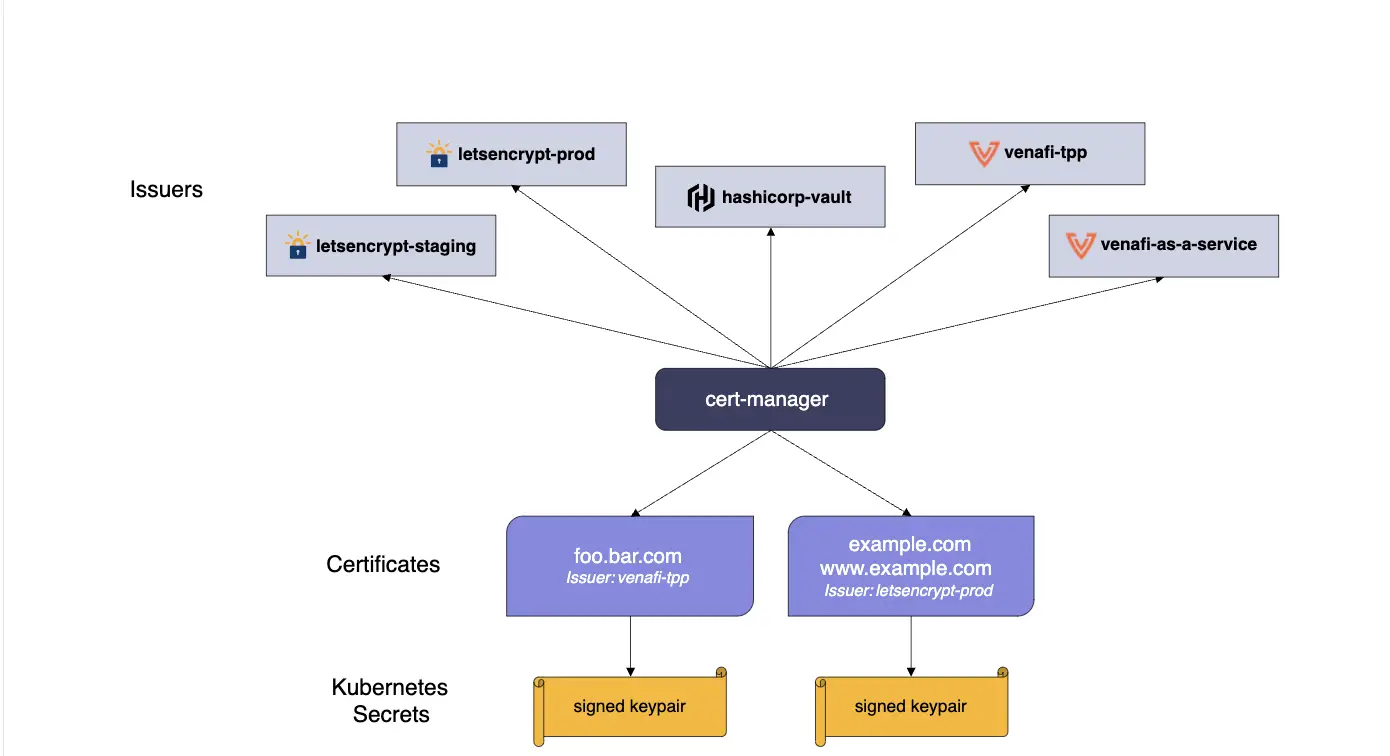
Cert-manager is a native Kubernetes certificate management controller. It can help with issuing certificates from a variety of sources, such as Let’s Encrypt, HashiCorp Vault, Venafi, a simple signing key pair, or self signed.
Let’s Encrypt is a nonprofit Certificate Authority that provides TLS certificates to 300 million websites.
##Steps
- Install Cert-manager onto your cluster
- Add LetsEncrypt as an Issuer (or ClusterIssuer)
- Update ingress to use certificate
###Install Cert-manager
kubectl apply -f https://github.com/cert-manager/cert-manager/releases/download/v1.1.1/cert-manager.yamlVerify installation of cert-manager by checking the cert-manager namespace for running pods
$ kubectl get pods --namespace cert-manager

NAME                                       READY   STATUS    RESTARTS   AGE
cert-manager-5c6866597-zw7kh               1/1     Running   0          2m
cert-manager-cainjector-577f6d9fd7-tr77l   1/1     Running   0          2m
cert-manager-webhook-787858fcdb-nlzsq      1/1     Running   0          2m
All good! Proceed
Issuer (or ClusterIssuer) - Let’s Enncrypt
a. Create either a clusterissuer.yaml manifest
apiVersion: cert-manager.io/v1
kind: ClusterIssuer # I'm using ClusterIssuer here
metadata:
  name: letsencrypt-prod
spec:
  acme:
    server: https://acme-v02.api.letsencrypt.org/directory
    email: <your-email-address>
    privateKeySecretRef:
      name: letsencrypt-prod
    solvers:
    - http01:
        ingress:
          class: traefik
b. Apply the manifest
kubectl apply -f clusterissuer.yamlCreate (or Update) Ingress
The following manifest is an example ingress resource:
apiVersion: networking.k8s.io/v1
kind: Ingress
metadata:
  labels:
    app: hello-world
  name:
  namespace: <namespace> # if non-default namespace
  annotations:
    cert-manager.io/cluster-issuer: letsencrypt-prod
spec:
  rules:
  - host: example.com # your domain
    http:
      paths:
      - backend:
          service:
            name: <your-service>
            port:
              number: 80 # use appropriate port
        path: /
        pathType: Prefix
  tls:
  - hosts:
    - example.com # your domain
    secretName: letsencrypt-prod # secret name, same as the privateKeySecretRef in the (Cluster)Issuer
Apply the manifest!
You can verify that a certificate has been issued
$ kubectl -n <namespace> describe certificate letsencrypt-prod
Spec:
  Dns Names:
    example.com
  Issuer Ref:
    Group:      cert-manager.io
    Kind:       ClusterIssuer
    Name:       letsencrypt-prod
  Secret Name:  letsencrypt-prod
  Usages:
    digital signature
    key encipherment
Status:
  Conditions:
    Last Transition Time:  2023-06-14T03:24:49Z
    Message:               Certificate is up to date and has not expired
    Observed Generation:   1
    Reason:                Ready
    Status:                True
    Type:                  Ready
  Not After:               2023-09-12T02:10:00Z
  Not Before:              2023-06-14T02:10:01Z
  Renewal Time:            2023-08-13T02:10:00Z
Events:                    <none>
You should now have TLS configured!
Leave your feedback, comments and questions below, and I’ll be happy to res you.
If you liked this, you can follow me on Twitter (@ileriayooo) where I share lot’s of info on Kubernetes, Cloud Native and DevOps.
Originally published on DEV Community.